
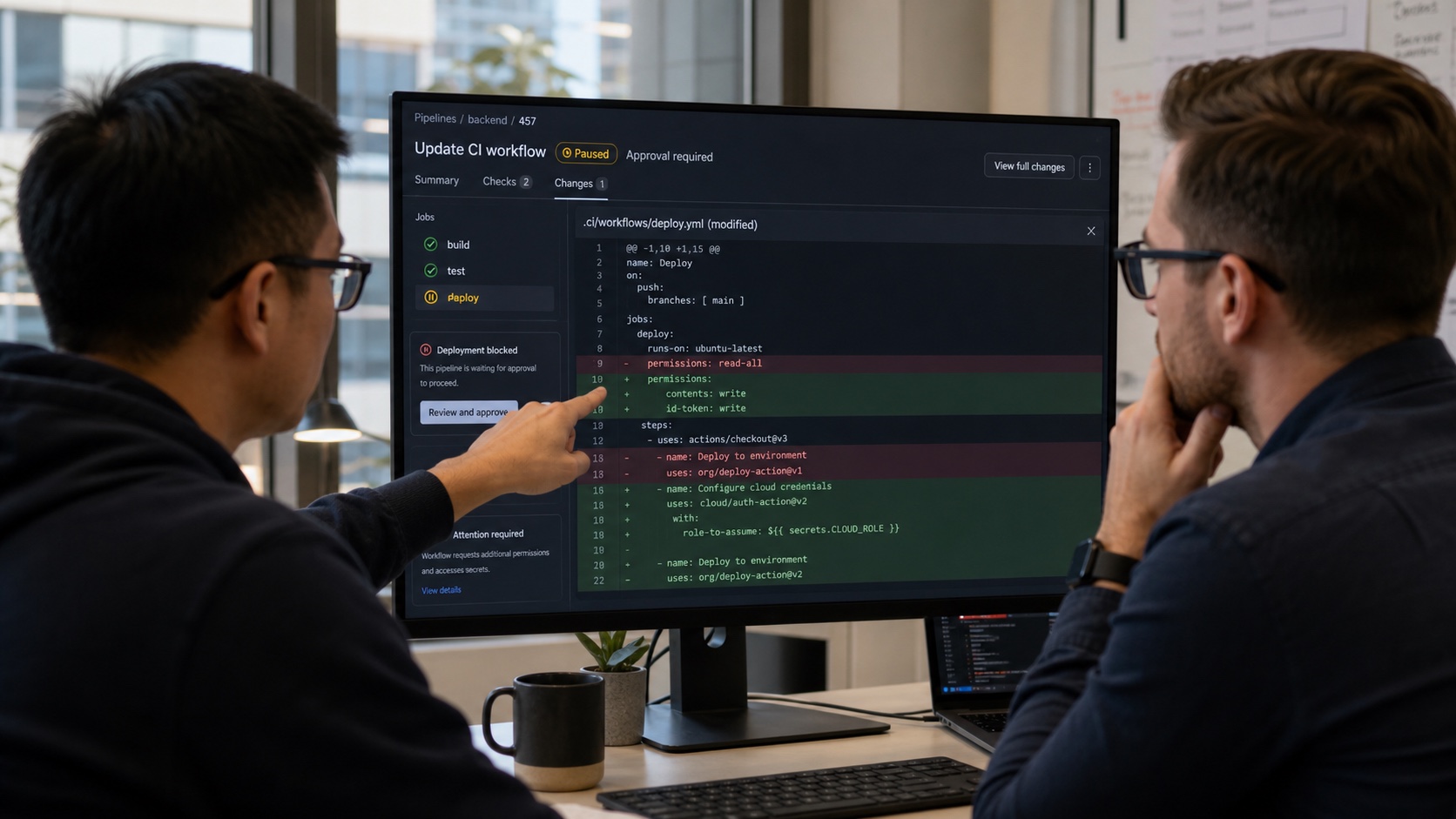
A small file under .github/workflows can download code, read tokens, publish a package or deploy to production. When a GitHub account is compromised, changing that file gives an attacker a direct route into the CI/CD supply chain. GitHub is adding a barrier: some Actions workflows identified as potentially malicious are now held before execution.
The run starts only after a collaborator with write access reviews and approves it. Approval must come from an authenticated web session. The protection is automatic, but currently limited to public repositories on github.com. GitHub Enterprise Server is not covered by the feature at this stage.
What the new control changes
GitHub says recent supply-chain attacks used compromised credentials to push malicious Actions workflows. Those workflows then attempted to steal CI/CD secrets or perform additional actions against the repository and connected systems.
The mechanism adds an intermediate state:
- a change or event would normally trigger a workflow;
- GitHub detects signals it considers suspicious;
- the run is held before a runner executes it;
- a collaborator with write access reviews the change;
- web approval releases the workflow, or the team leaves it blocked and investigates.
No configuration is required to enable the protection within its current scope. GitHub does not publish every detection signal, which also avoids giving attackers a precise bypass recipe.
Why workflows are valuable targets
A pipeline is more than a test script. It may receive a GITHUB_TOKEN, read repository or environment secrets, request a cloud identity through OIDC, write to a registry and launch a deployment. Self-hosted runners may also reach internal networks or persistent files.
An attacker does not need to alter the product directly. They can add a step that sends a variable to an external server, swap an action for a compromised version, modify a script invoked by the pipeline or exploit an expression built from untrusted input.
The danger comes from combining modifiable code with a privileged context. An apparently small change such as adding write permission, a curl command or a third-party action must be assessed against the rights of the entire job.
This is not the standard fork approval policy
GitHub already lets projects require approval for workflows triggered by external pull requests. Depending on repository settings, that review may apply to people new to GitHub, first-time contributors or every external contributor.
That policy is largely based on where a contribution originated and the author's relationship with the project. The newly announced control targets workflows detected as potentially malicious in the context of attacks that use compromised accounts.
The protections complement each other. A known contributor can lose control of an account. Conversely, a workflow from a new contributor can be legitimate while still requiring review. Maintainers must not read the absence of an automatic hold as a security approval.
What to review before clicking approve
The approval button must not become a routine way to make a red CI pipeline move again. Before releasing the run, a maintainer should compare the change with the expected behavior.
At minimum, review:
- changed files under
.github/workflows, composite actions and invoked scripts; - the event trigger, especially
pull_request_target,workflow_run,pushandworkflow_dispatch; - any increase in
GITHUB_TOKENpermissions; - access to repository, organization or environment secrets;
- cloud identities requested through
id-token: write; - network commands, downloads and data uploads;
- new third-party actions or changed references;
- the selected runner and any access it has to internal networks;
- artifacts, caches and outputs originating in a less privileged workflow.
Teams should also confirm the author's identity over another channel when the change is unusual. Signed commits and protected accounts reduce some risks, but a compromised workstation may still create a convincing modification.
Privileged triggers remain sensitive
GitHub's secure-use documentation highlights the risk of pull_request_target and workflow_run when they consume untrusted code. Those triggers may run in the main branch context with permissions or secrets unavailable to a standard pull_request workflow.
The dangerous pattern is executing pull-request-controlled code in that privileged context. Even when the YAML looks harmless, checking out an external branch and running an installation script can hand control to the contributor.
A safer architecture separates stages. An unprivileged workflow compiles or tests code without secrets, then a distinct privileged workflow consumes only strictly validated results. Artifacts and caches must also be treated as untrusted inputs rather than neutral storage.
Limiting damage when a workflow gets through
GitHub's detection creates another opportunity to stop an attack. Least privilege contains the damage when detection fails. Each workflow should declare the smallest possible permission set, preferably read-only by default, and open only the capability required by a specific job.
For deployments, environment secrets and protection rules can delay access to sensitive credentials until a dedicated review. OIDC removes some long-lived cloud secrets, provided the cloud policy precisely restricts the authorized repository, branch, environment and audience.
Third-party actions should be pinned to a full commit SHA instead of a mutable tag. Self-hosted runners should not execute untrusted external code on a persistent machine connected to production networks.
Audit logs, alerts for workflow modifications and rapid credential rotation also belong in the incident plan. If a suspicious run has already started, canceling the job is not enough: assume that every accessible secret may have been read.
What to do when a run is held
A team can formalize a short response procedure:
- do not approve immediately, even when the change appears urgent;
- record the run ID, commit, actor and timestamp;
- compare the diff with the expected ticket or business request;
- contact the author through an independent channel;
- examine recent account sessions and related commits;
- reject or neutralize the workflow if doubt remains;
- revoke sessions and rotate secrets when an earlier execution looks suspicious;
- document the decision and improve internal review rules.
The approver needs enough time and expertise to make that decision. Granting write access merely so another person can click the button unnecessarily expands the attack surface.
A useful barrier, not a verdict
The automatic control sits at the right point: before a file capable of turning a compromised account into access to delivery systems is executed. It can disrupt an attack that relies on fast and silent automation.
GitHub does not claim that this announcement detects every malicious workflow or protects private repositories and Enterprise Server installations. A workflow that is not held can still be dangerous, and one that is held can be legitimate.
The mechanism's value therefore depends on human review. A team that checks permissions, secrets, retrieved code and author identity turns the pause into a security control. A team that approves automatically only delays execution by a few minutes.

Join the discussion
Comments
Loading comments…