
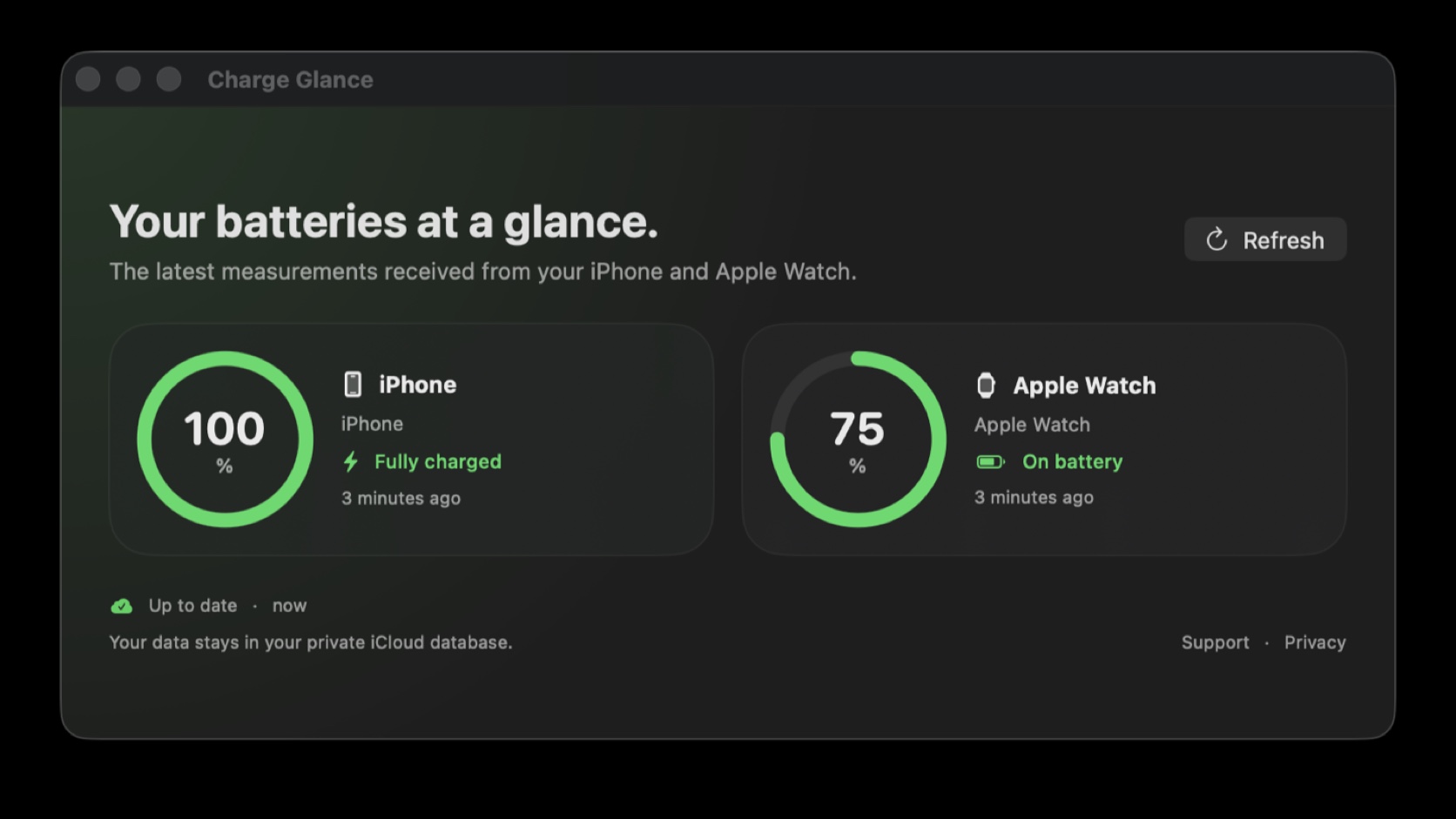
How much power remains on the iPhone left in another room? Will the Apple Watch last until the end of the day? Charge Glance brings both answers directly to the Mac through a dashboard and a compact menu bar view. The app is available free of charge on the App Store in English and French.
Charge Glance is developed by Les Forgerons, which also publishes this site. This article therefore explains the product and its limitations transparently; it is not an independent review. The app has a deliberately focused purpose: removing the need to pick up each device solely to inspect its battery level.
The short answer
| Question | Answer |
|---|---|
| What does Charge Glance show on Mac? | The percentage, charging state and date of the latest iPhone and Apple Watch measurement. |
| Is the app free? | Yes. It is available free of charge from the App Store. |
| Must it be installed on several devices? | Yes. The iPhone companion supplies the Mac; the Watch companion is optional. |
| Which account is required? | The same iCloud account on the iPhone and Mac. |
| Are measurements public? | No. They travel through the user's private CloudKit database. |
| Is the displayed level always live? | No. iOS and watchOS can suspend apps, so the timestamp indicates measurement freshness. |
A simple piece of information missing between Apple devices
Each Apple device can display its own battery. The iPhone has an indicator and widgets, Apple Watch shows its level in Control Center or a complication, and macOS monitors the Mac battery. However, checking the levels of a paired iPhone and Apple Watch directly from a Mac is not an equally straightforward system feature.
Charge Glance fills that particular gap. Its macOS window presents one card for the iPhone and another for the watch. A colored ring indicates the available percentage, while a label states whether the device is on battery, charging or fully charged. A relative date such as “three minutes ago” prevents an old measurement from being mistaken for real-time data.
The menu bar item further reduces the number of actions. Opening it reveals both levels without keeping the main window on screen. That format is especially useful for people who spend long periods working on a Mac while leaving their phone in a bag, on a stand or in another room.
Three apps move two measurements
Charge Glance consists of three SwiftUI components. The iOS app measures the iPhone battery. The watchOS app reads the Apple Watch battery and sends its snapshot to the phone through the communication link designed for the paired devices. The iPhone companion then combines both values and synchronizes them to the Mac.
This architecture may appear more complicated than the result it displays. It addresses an Apple constraint: macOS has no public API that can directly and continuously query an iPhone or Apple Watch battery. Each device must produce its own measurement within the operating system's permitted execution time.
On the Mac, Charge Glance listens for synchronized changes and retains a periodic fallback refresh. The Refresh button requests the latest information available. Opening the app on the iPhone or watch forces a fresh measurement on that device when the system allows it.
How to install Charge Glance
The first step is downloading Charge Glance from the App Store on the iPhone and Mac. Both devices must use the same iCloud account, with iCloud Drive available. The iPhone application is the required companion: without it, the Mac cannot receive the phone level.
To include Apple Watch, install or open the watchOS companion on the watch already paired with the iPhone. Open Charge Glance on the Watch first so that it produces a measurement, then on the iPhone so the phone can receive and synchronize it. Finally, launch the macOS app and use Refresh if the cards do not fill immediately.
The Apple Watch companion remains optional. Someone who only wants to see an iPhone from a Mac can use Charge Glance without a watch. Conversely, the Watch measurement travels through the iPhone rather than going directly to the Mac.
What is it useful for every day?
The first use is anticipating a charge. During a video call or work session, a glance at the menu bar can show whether the iPhone will last through a trip later in the day. The watch level helps decide whether to place it on its charger for a few minutes before exercise or a night of sleep tracking.
Charge Glance can also eliminate repetitive checks. A phone charging away from the desk does not need to be handled repeatedly to determine whether it is ready. The charging or fully charged state provides more context than a percentage alone.
The app does not attempt to analyze battery health, cycles, charger power or per-app energy consumption. It answers a more immediate question: what is the latest known state of my mobile devices? Maximum capacity and wear information remain available through the Battery settings on each operating system.
Data stays in private iCloud storage
Snapshots include the percentage, charging state, device display name and measurement date. They are stored in the private CloudKit database associated with the user's iCloud account. Access from the Mac requires that same account.
Les Forgerons does not operate an intermediary server receiving these battery levels and cannot inspect the user's private database. Charge Glance contains no advertising, analytics SDK, cross-app tracking or third-party marketing technology. Information remains in iCloud and local app storage.
That decision minimizes collection but makes the app dependent on Apple services. When iCloud is unavailable, signed out or disabled, synchronization cannot operate normally. Users can remove the data through iCloud storage settings, while uninstalling the apps also removes their local data.
Why the measurement date matters
Charge Glance does not claim that every value streams continuously. iOS and watchOS manage background activity to preserve power. An app may be suspended, synchronization can be delayed, or a silent notification may not be delivered. The Mac can consequently show the latest received measurement rather than the exact level at the present second.
The date below each device is therefore not decorative metadata. A value of 80% measured two minutes ago is generally sufficient for deciding whether to leave. The same value several hours old should be refreshed before drawing a conclusion.
When a measurement is missing or seems old, open the companion on the affected device. Then confirm that the iPhone and Mac use the same account, iCloud Drive is enabled and the Watch communicates correctly with the iPhone. Wait briefly and trigger another refresh on macOS.
What Charge Glance does not do
The application does not control charging or impose an 80% limit. It does not directly improve battery life or replace Low Power Mode. Nor does it monitor every Bluetooth accessory in a household. Its current scope focuses on one user's iPhone and Apple Watch.
It should not be treated as a critical alarm that guarantees an instantaneous value. Background restrictions make it impossible to promise that every change will appear immediately. For an urgent check, the device's own screen remains the most direct source.
This acknowledged limitation supports a readable interface and limited data collection. Charge Glance shows what it knows, states when it learned it and lets the user judge whether the measurement is recent enough.
A small utility designed for the Apple ecosystem
Charge Glance primarily serves people who own a Mac and iPhone, optionally with an Apple Watch, and spend much of their day in macOS. It offers less to someone who always keeps the phone within reach or already checks the watch complication routinely.
For everyone else, the benefit is a small friction removed several times a day. The product does not promise to transform battery performance; it simply puts useful information on the screen already in use. Being free, ad-free and privately synchronized makes it possible to try without a subscription or another account.
Charge Glance is available from the App Store and requires at least iOS 17, macOS 14 and watchOS 10 for the corresponding components. Users can begin with the iPhone and Mac, then add the Apple Watch companion if they want both batteries in the same glance.


Join the discussion
Comments
Loading comments…